Flopzilla on Mac ·

Does Flopzilla work on Mac?

No — Flopzilla is Windows-only, and there is no Flopzilla for Mac. On today's Apple Silicon Macs you can run it through a Windows layer like CrossOver or a Parallels VM, or use a native macOS analyzer instead.

That isn't a rumor or a version gap. Flopzilla's own system requirements start at Windows 7, and SplitSuit — its best-known reseller — states it in capitals: "Flopzilla does not work on Mac, Android, or iOS." What follows is what actually works on a current Mac, what quietly stopped working, and where a native alternative fits.

Full disclosure: this page is written by the developer of FlopLab, a native Mac analyzer — judge everything below with that in mind. The Flopzilla facts are sourced from flopzilla.com and its resellers.

How can you run Flopzilla on a Mac today?

Two routes genuinely work in 2026. Both mean running Windows software on macOS, and both are decent — which one fits depends on how much you already live in Windows tools.

CrossOver — a Wine translation layer

CrossOver runs Windows programs without installing Windows, and CodeWeavers maintains a Flopzilla entry in its compatibility database. It's the lighter path: no VM, no Windows license.

The honest catch: it's paid software, and you're maintaining a translation layer for one small program. Users report the setup takes some trial and error. If you already use CrossOver for other Windows tools, it's the natural choice.
Parallels Desktop — a full Windows VM

Parallels runs Windows 11 on Apple Silicon, and Flopzilla installs inside it like on any PC. It's the most compatible route — Flopzilla itself is light (its stated requirements are two cores and 1 GB of RAM), so once the VM exists the app is not the bottleneck.

The honest catch: it's the heaviest and most expensive setup — a Parallels subscription plus a Windows license, all to study with one $25 tool.

What no longer works

Much of what ranks for this question predates the hardware you'd run it on today. Two workarounds you'll still see recommended are dead ends on any Apple Silicon Mac:

  • Boot Camp — doesn't exist on Apple Silicon. Any guide recommending it was written for Intel Macs, which Apple stopped selling in 2023.
  • WineBottler — broke when macOS Catalina dropped 32-bit apps in 2019 and was never updated for what came after.

Want to skip the Windows layer entirely?

FlopLab is a range analyzer built natively for the Mac — no VM, no translation layer, no Windows license. It's in private beta now.

No spam — a confirmation email now, an invite later.

Is there a native Mac alternative to Flopzilla?

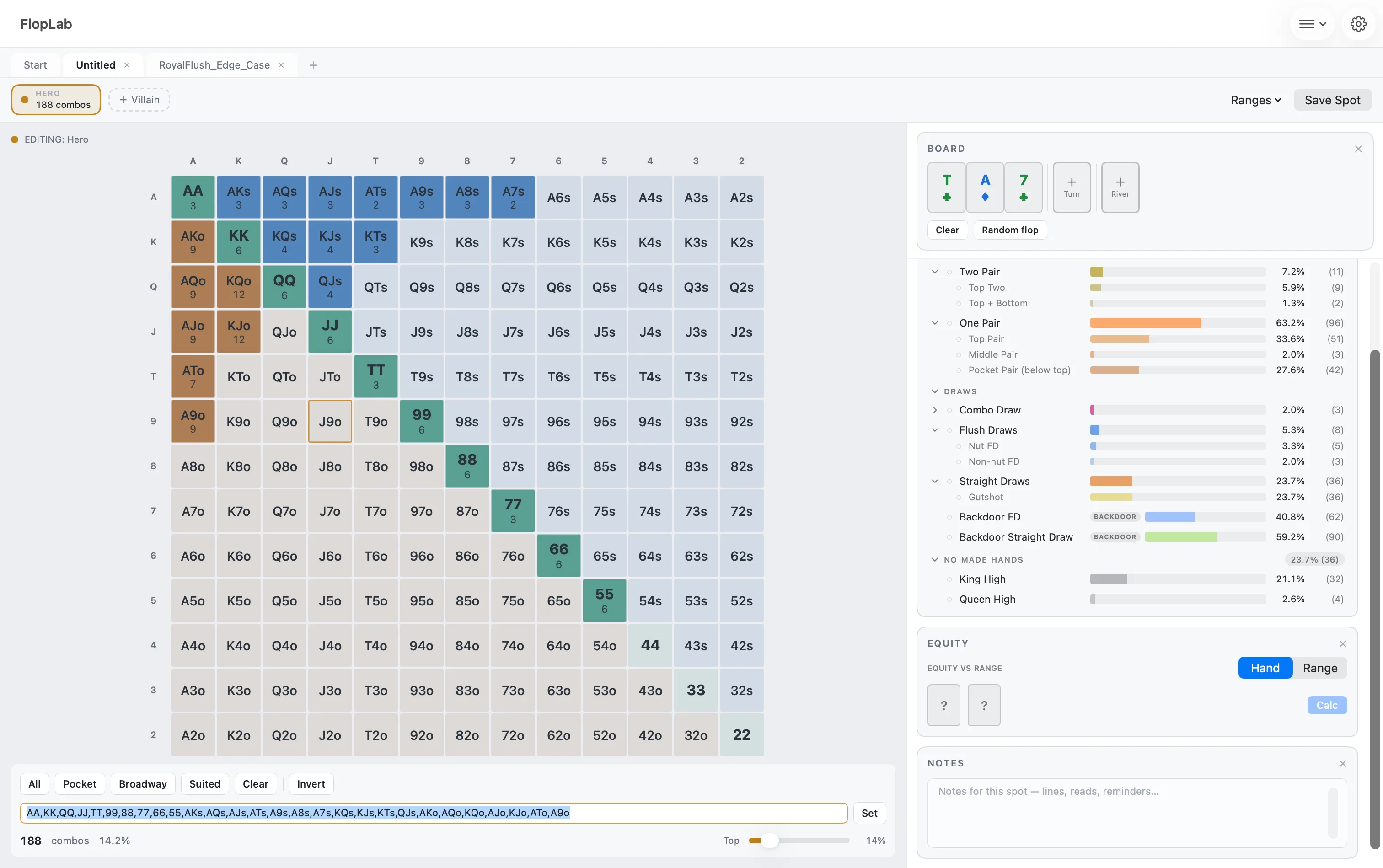
Yes — that's the tool this site is about. FlopLab is a poker range and board-texture analyzer built for macOS in SwiftUI: the same style of study workflow — build a range, set a board, see how the range hits, filter it down — designed as its own tool rather than a port. Everything computes on-device, instantly.

FlopLab on macOS: the 13×13 range matrix beside the board and the hand breakdown

What FlopLab does today

  • 13×13 range matrix with per-combo weights
  • Position presets for common spots
  • Paste ranges as plain text (QQ+, AKs…)
  • Full made-hand and draw breakdown, sixty-plus categories
  • One-click keep/cut filters — every number recalculates live
  • Click any stat to light up its combos in the matrix
  • Heads-up equity: hand vs range and range vs range
  • Range adjustments with undo
  • Whole spots saved in tabs, autosaved as you work
  • Ranges saved as .frange documents you can share

What it doesn't do yet

  • Multiway analysis (three or more players)
  • Equity graphs and distributions
  • Flop-texture breakdown tools
  • GTO+ sync
  • Colored hand groups and the pie chart
  • Range text export — import works, export doesn’t yet
  • Importing a saved Flopzilla range library — ranges come across as pasted text, not as a predef file

Honest status: FlopLab is in private beta — you can't download it today. Invites go out in waitlist order; a free tier is planned for September–October 2026 and Pro is a one-time purchase, never a subscription. Details on the tiers and in the FAQ.

What does Flopzilla still do better?

A lot, and pretending otherwise would insult your intelligence. Flopzilla has been refined since 2009, and its $25 one-time lifetime license — covering both Flopzilla v1 and Flopzilla Pro on two computers — is genuinely hard to beat. Pro brings tools FlopLab doesn't have yet: multiway range-vs-range for big pots, the equity graph and equity matrix, the flop-breakdown texture tool, and two-way sync with the GTO+ solver. There's also seventeen years of books, videos, and coaching material keyed to its exact stat labels.

If your study depends on those today, Flopzilla inside CrossOver or Parallels is the honest recommendation — the point of this page is to make that trade clear, not to hide it.

Which option should you pick?

  • You own Flopzilla, or need Pro's full toolset now. Run it: CrossOver if you're comfortable tinkering, Parallels if you want maximum compatibility and don't mind the cost. Both work; neither is native.
  • You're Mac-first and starting from zero. The VM route costs real money before you've spent Flopzilla's own $25. FlopLab's waitlist costs nothing, and the beta is free while it lasts.
  • You study with a solver and want the exploration layer. On Windows, Flopzilla Pro syncs with GTO+ directly. FlopLab reads plain range text — paste QQ+, AKs, 77-JJ and it builds the range. Solver file formats aren't supported yet.

Ready for a Mac-native range analyzer?

Join the waitlist for the private beta — free while it lasts, everything unlocked, invites in waitlist order.

No spam — a confirmation email now, an invite later.

More on the homepage: what's in FlopLab · beta, Free and Pro · the FAQ